
Go Back
The Hidden Time Cost of Photo Documentation (And How Video Solves It)
The hidden time cost of photo documentation in traffic management extends far beyond the 10-15 minutes spent taking pictures. Video documentation eliminates these hidden costs by automatically uploading, linking to job bookings, and providing instant searchability—saving contractors 300+ hours annually while providing superior evidence quality.


The hidden time cost of photo documentation in traffic management extends far beyond the 10-15 minutes spent taking pictures. When you factor in organising scattered photos across multiple devices, manually attaching files to job bookings, searching for specific images weeks later, and compiling evidence when clients request verification, the true cost reaches 20-25 minutes per site. Video documentation eliminates these hidden costs by automatically uploading, linking to job bookings, and providing instant searchability—saving contractors 300+ hours annually while providing superior evidence quality.
The Invoice You Never See
Every traffic management contractor knows the visible cost of documentation: the 10-15 minutes spent photographing signage and site conditions after setup.
But there's another invoice that never gets calculated. It arrives in fragments throughout the day, week, and month:
The 5 minutes your office admin spends sorting through photos to find the right site.
The 10 minutes a supervisor wastes compiling images from three different crew members' phones when a client requests verification.
The 15 minutes lost when you can't find that one critical photo from a job three months ago, and now you're trying to recreate evidence from memory.
The 30 minutes burned when your team debates which photos actually show the final setup versus the ones taken before adjustments were made.
These moments don't feel like documentation costs. They feel like normal operational friction, the kind everyone accepts as "just how things are."
But when you add up all these hidden costs across hundreds of sites per year, you're not looking at minutes anymore.
You're looking at weeks of lost productivity that could be eliminated entirely.

The Real Cost Breakdown: Where Time Actually Goes
Let's follow a typical traffic management setup through its complete documentation lifecycle and count every minute spent handling photos:
Day 1: Site Setup and Documentation (Visible Cost)
On-Site Photo Taking: 12 minutes
Walking to each sign placement: 3 min
Taking photos from multiple angles: 6 min
Checking coverage and retaking unclear shots: 2 min
Photographing site conditions and approaches: 1 min
Initial Upload: 3 minutes
Opening job management app on phone: 30 sec
Navigating to correct booking: 30 sec
Waiting for photos to upload (especially with poor coverage): 1-2 min
Attaching to booking or checklist: 30 sec
Subtotal: 15 minutes (This is the cost everyone sees)
Day 1-7: Post-Job Administration (First Hidden Cost)
Organising and Verifying: 5-8 minutes per site
Operations Coordinator reviews uploaded photos: 2 min
Realises some photos are from wrong crew member's phone: 1 min
Contacts crew to get missing images: 2 min
Waits for uploads or downloads from messages/email and manually attaches: 2-3 min
Adds location notes or clarifications: 1 min
Subtotal: 7 minutes average (Hidden cost #1)
Week 2-4: Client Verification Requests (Second Hidden Cost)
Compiling Evidence on Demand: 10-15 minutes per request
A client project manager emails: "Can you send photos of your setup from the Miller Street job on November 12?"
Now the clock starts again:
Search job management system for the booking: 1 min
Find the associated photos (hopefully they're all there): 2 min
Download photos from system: 1 min
Create email or file share: 1 min
Write explanatory text about what each photo shows: 3-4 min
Send and follow up on whether they received everything: 2 min
If photos are scattered across multiple crew phones or weren't uploaded properly:
Track down crew member who was on site: 3 min
Wait for them to upload or send from their personal device: 5-20 min
Repeat organisation process: 5 min
Best case: 10 minutes
Realistic case: 15-25 minutes
How often does this happen? For contractors with multiple active projects, client verification requests can come in 2-4 times per week.
Monthly cost: 8-16 requests × 15 minutes = 2-4 hours (Hidden cost #2)
Month 3-6: Dispute or Compliance Review (Third Hidden Cost)
Reconstructing Evidence After the Fact: 30-120 minutes per dispute
A client questions your setup from three months ago. Or a regulator asks for verification of compliance with your approved TGS. Or an incident occurred near your work zone, and you need to prove your setup was correct.
Now you're in deep:
Phase 1: Locating the photos (15-30 min)
Search through job management system by date/location: 5 min
Photos for the job are incomplete: 5 min
Check if backup exists in crew member's phone: 10 min
Realise crew member has deleted photos from their device: 5 min
Search email/messages for any photos sent at the time: 5-15 min
Phase 2: Piecing together what happened (20-40 min)
Review fragmented photos, trying to understand the complete setup: 10 min
Photos show different angles but not a clear sequential flow: 5 min
Some photos are timestamped before final adjustments were made: 5 min
Contact crew member to ask what they remember: 10 min
Crew member's memory is fuzzy after three months: 5-10 min
Phase 3: Creating comprehensive response (20-30 min)
Write detailed explanation of setup: 15 min
Create map or diagram to supplement photos: 10 min
Compile checklist and other documentation: 5 min
Format everything professionally for submission: 10 min
Phase 4: Follow-up and clarification (15-20 min)
Client/regulator has questions about gaps in documentation: 10 min
Additional back-and-forth trying to fill in missing context: 5-10 min
Total time spent on one dispute: 70-120 minutes
How often does this happen? Even well-run operations face 2-4 serious documentation requests per year requiring this level of detail.
Annual cost: 3 disputes × 90 minutes = 4.5 hours (Hidden cost #3)
Ongoing: The Daily Micro-Costs (Fourth Hidden Cost)
These small moments happen constantly but rarely get tracked:
Searching for specific photos: 3-5 minutes, 2-3 times per week
"Which job was that sign damage photo from?"
"Can you find the photos showing the VMS board placement?"
"I need to see how we set up that similar site last month"
Weekly cost: 10-15 minutes
Annual cost: 8-13 hours (Hidden cost #4)
Clarifying which photos show final setup: 5 minutes, 1-2 times per week
"These photos are timestamped before we moved that sign"
"Wait, this isn't the final configuration"
"Do we have photos after the changes?"
Weekly cost: 5-10 minutes
Annual cost: 4-8 hours (Hidden cost #5)
Technical issues with photo management: 10 minutes per month
Phone storage full, can't take more photos
Photo upload failed, need to retry
Wrong photos attached to wrong booking
File corruption or quality issues
Annual cost: 2 hours (Hidden cost #6)
The True Cost: A Complete Picture
Let's add up all the costs for a traffic management contractor completing 1,000 sites per year:
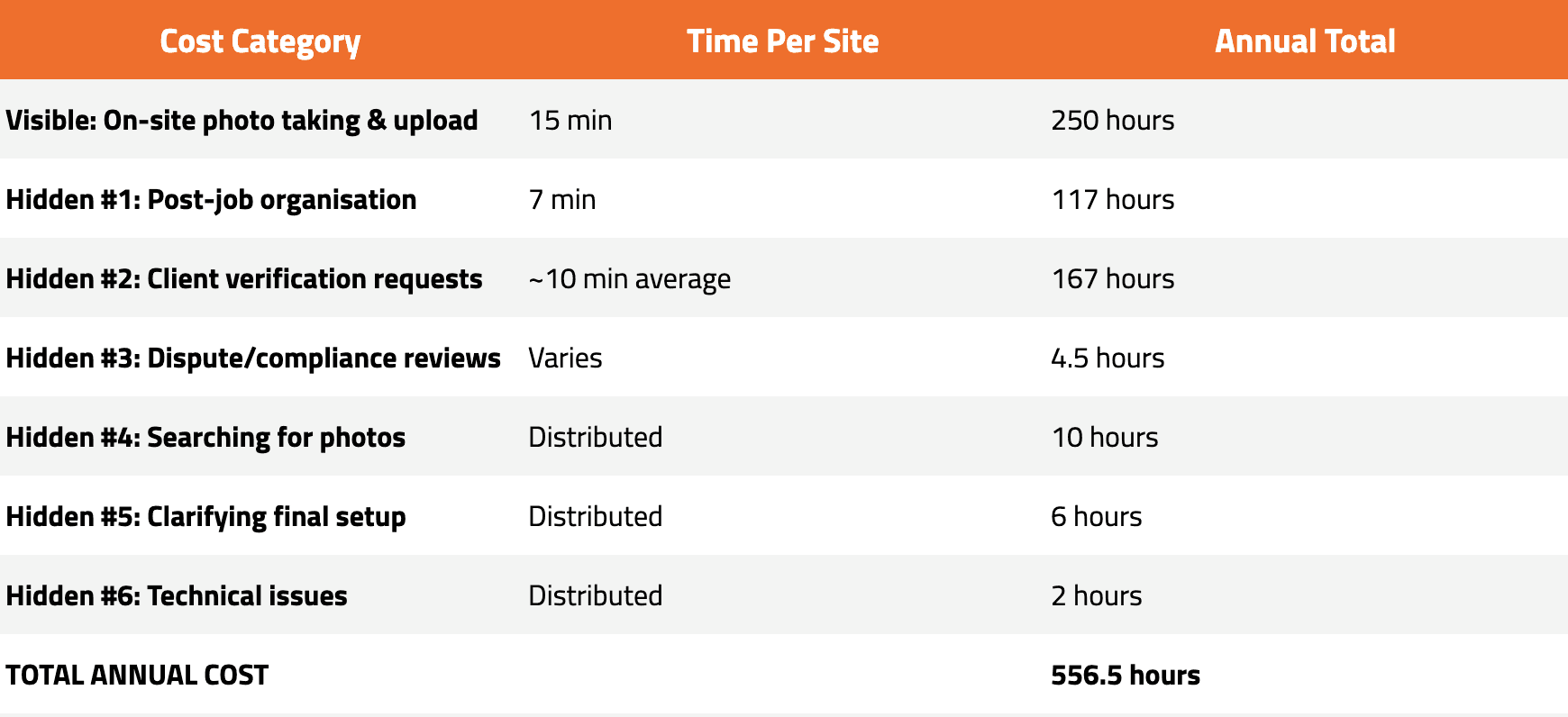
556.5 hours = 13.9 full work weeks = 3.4 months of full-time work
For a team of 5 traffic controllers, this documentation overhead consumes nearly 3 weeks of one person's annual capacity.
And this doesn't even account for:
The opportunity cost of work not completed during documentation time
The stress and frustration of scrambling for evidence under pressure
The client relationship damage when you can't quickly provide verification
The risk exposure from incomplete or fragmented documentation
Why Photos Create These Hidden Costs
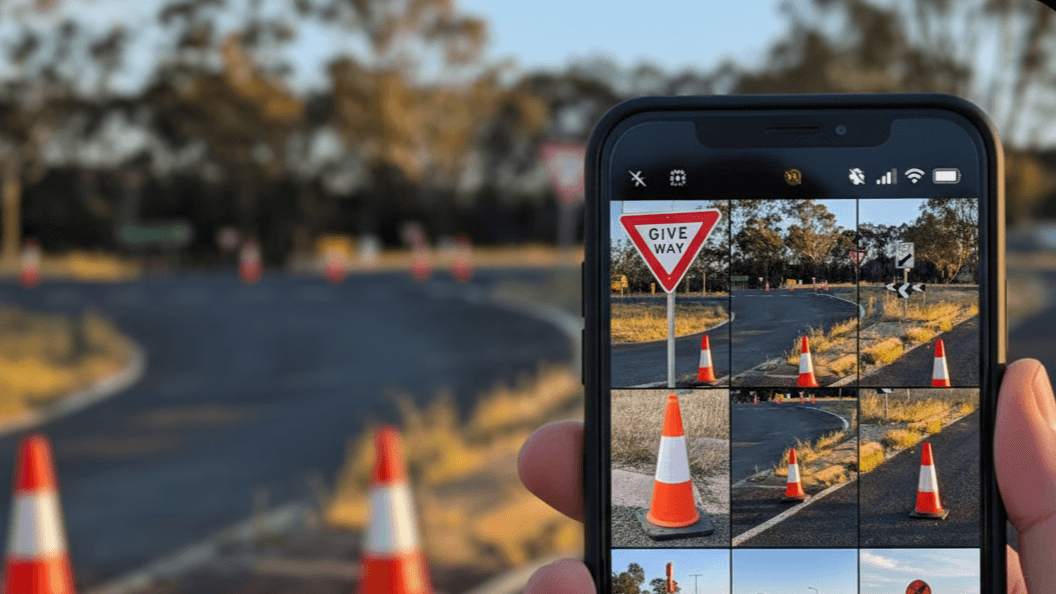
The problem isn't the photos themselves. The problem is that photos are:
1. Fragmented by Design
Each photo is a separate file. A complete site might have 10-15 separate files that need to be organised, stored, and retrieved together. But they live on individual devices, get uploaded separately, and exist as disconnected pieces.
When you need to understand what happened on a site, you're forced to mentally reconstruct a narrative from fragments—like assembling a puzzle without seeing the picture on the box.
2. Device-Dependent
Photos live on whoever's phone took them. When that crew member is off-site, on leave, or has moved to a new phone, those photos become harder to access. Even when properly uploaded, you're often searching multiple devices or accounts to find complete coverage.
3. Context-Free
A photo shows what something looked like at one moment from one angle. But it doesn't show:
What came before or after
How elements relate spatially
The sequence of the setup
The dynamic conditions (traffic flow, weather changes)
What the controller was thinking or noting at the time
This missing context is why you spend so much time later explaining, clarifying, and supplementing photos with written descriptions.
4. Manually Managed
Every photo requires human decisions:
Should I attach this to the checklist or the booking?
What should I name this file?
Is this photo clear enough or should I retake it?
Did I get all the angles I need?
These micro-decisions compound across hundreds of sites, creating administrative overhead that never ends.
5. Hard to Search
Try finding "the photos showing our VMS board placement from that Miller Street job in early October" in your job management system. You'll search by date, by location, by crew member, scrolling through dozens of thumbnails hoping you recognise the right images.
Photos don't describe themselves. They require you to remember or reconstruct context about when and where they were taken.
How Video Documentation Eliminates Hidden Costs
Video documentation doesn't just replace the 15 minutes of on-site photo taking. It eliminates entire categories of hidden costs by fundamentally changing how documentation works.
Here's how:
Cost #1 Eliminated: Post-Job Organisation

The photo problem: Multiple photos from multiple devices need to be collected, verified, organised, and properly attached.
The video solution: One video per site, automatically uploaded from the device that recorded it, automatically linked to the correct job booking via integration with your job management system (like Traffio).
Administrative overhead: Zero
Your office admin doesn't spend time organising because there's nothing to organise. The video is already where it needs to be, attached to the right booking, with timestamp and GPS data embedded.
Time saved: 7 minutes per site = 117 hours per year
Cost #2 Eliminated: Client Verification Requests
The photo problem: When clients request site verification, you search for photos, download them, compile them, write explanations, and send them—hoping you found everything.
The video solution:
Open your job management system
Find the booking (takes 30 seconds)
Generate a shareable link to the video
Send link to client (takes 30 seconds)
Client now has access to timestamped, geolocated video showing the complete site setup from start to finish. No compilation. No explanation needed. No missing pieces.
Time per request: 90 seconds instead of 15 minutes
For a contractor handling 8 verification requests per month:
Old way: 8 × 15 min = 120 min/month = 24 hours/year
New way: 8 × 1.5 min = 12 min/month = 2.4 hours/year
Time saved: 21.6 hours per year
Cost #3 Eliminated: Dispute Resolution Time
The photo problem: Reconstructing what happened from fragmented photos three months later requires detective work, crew member interviews, memory reconstruction, and supplemental documentation.
The video solution: Pull up the video. Watch what actually happened. Send link to client/regulator.
A video recorded during the site inspection shows: ✓ Complete sequential setup ✓ All signage and device placement ✓ Site conditions at the time ✓ Spatial relationships and context ✓ Exactly what the crew saw and did
No reconstruction needed. No memory required. No gaps to fill.
Dispute resolution time:
With photos: 70-120 minutes
With video: 15-20 minutes (watch video, send link, brief response)
Time saved per dispute: 60-90 minutes
For 3 disputes per year: 3-4.5 hours saved
Cost #4 Eliminated: Searching for Specific Documentation
The photo problem: "Find me the photos from that job" means scrolling through thumbnails, checking dates, confirming locations, and hoping you recognise the right site.
The video solution: Videos are linked to job bookings. Search by:
Job number
Date
Location
Client name
Crew member
Find exactly what you need in 10-20 seconds instead of 3-5 minutes.
Time saved: 3-4 minutes per search
With 100-150 searches per year: 5-10 hours saved
Cost #5 Eliminated: Clarifying Final Setup
The photo problem: Photos might be taken before adjustments, during setup, or after changes—creating confusion about what the final configuration actually was.
The video solution: Record your video during your final site inspection after setup is complete. The video shows the final, live setup—not an in-progress state.
No ambiguity. No "wait, did we move that sign?" No debate about whether photos show the final configuration.
Time saved: 5 minutes per week = 4-8 hours per year
Cost #6 Eliminated: Technical Issues
The photo problem: Phone storage full, upload failures, wrong attachments, file corruption.
The video solution: Videos are managed by purpose-built software designed for field conditions:
Efficient compression (doesn't fill phone storage)
Automatic retry on upload failures
Impossible to attach to wrong booking (integration handles it)
Cloud backup ensures no data loss
Time saved: 2 hours per year
The Total Time Savings with Video Documentation
Going back to our 1,000 sites per year contractor:
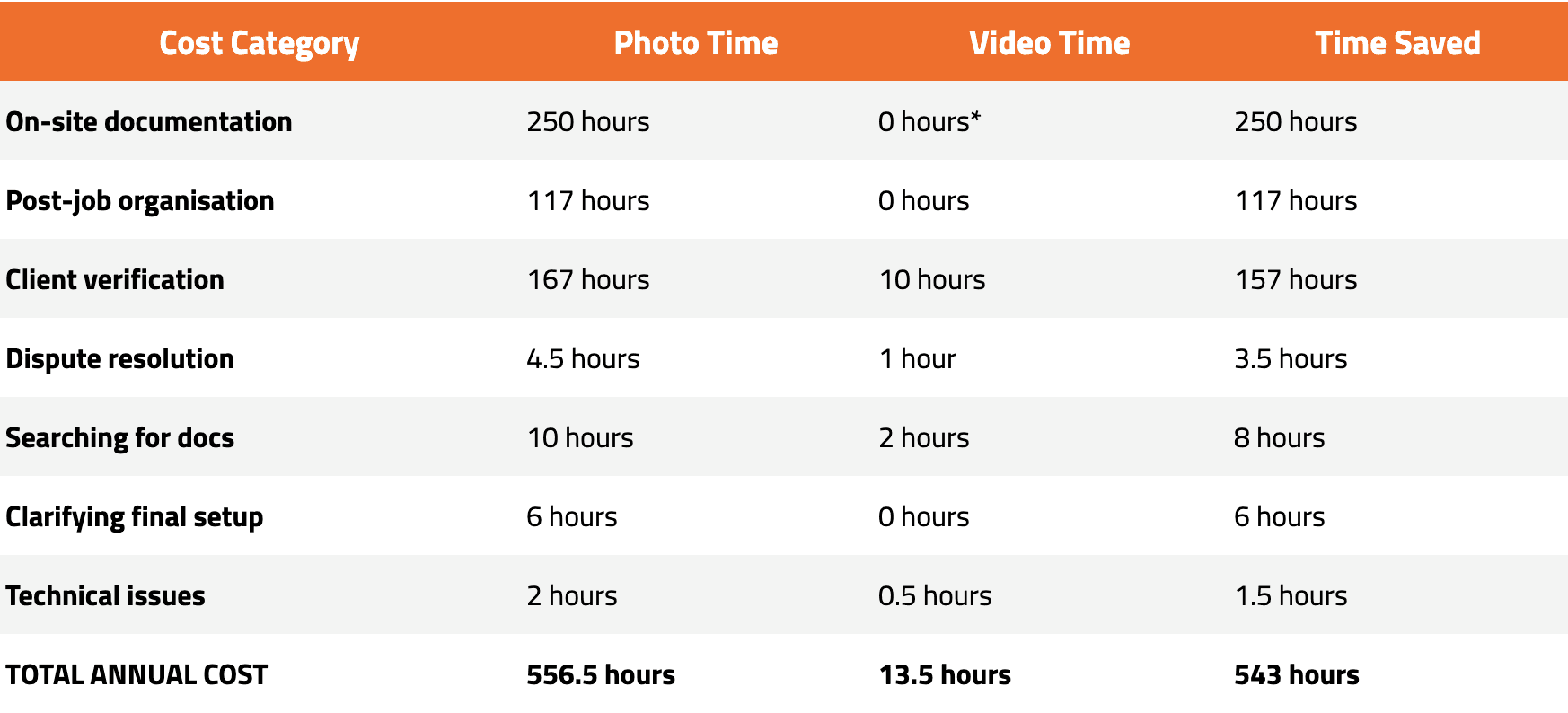
*Video is recorded during the required site inspection, so it adds zero time to the workflow
543 hours saved = 13.6 work weeks = 3.4 months of productivity returned
For a team of 5 traffic controllers earning an average of $40/hour (including overhead), this represents:
$21,720 in annual cost savings
And this is purely the time cost. It doesn't include:
Faster dispute resolution reducing legal exposure
Improved client satisfaction from instant verification
Reduced risk from superior evidence quality
Competitive advantage from documentation capabilities
Real-World Results: What Contractors Are Experiencing
The theoretical time savings are compelling. But what are contractors actually experiencing after switching from photos to video documentation?
On Administrative Overhead: "Our Project Coordinator used to spend 2-3 hours every Monday organising photos from the previous week. Now she spends maybe 15 minutes spot-checking that videos uploaded properly. That's 2-3 hours per week back for more valuable work." - Operations Manager, Melbourne TM contractor
On Client Requests: "Clients love receiving links instantly. We used to scramble to compile photos when they'd request verification. Now it's literally: open the app, generate link, send email. Takes less than two minutes. Game-changer for our client relationships." - General Manager, Brisbane TM company
On Dispute Resolution: "We had a dispute about whether our setup matched the approved TGS. With photos, we would have been piecing together evidence for hours and hoping it was convincing. Instead, we sent the video link. Dispute resolved in 20 minutes. The video showed exactly what we did." - Traffic Controller - Team Leader, Perth
On Search and Retrieval: "Being able to search by job number and immediately see the video has saved us countless hours. Our planners reference past sites all the time when planning new ones. It used to be 'does anyone remember how we set up that job?' Now it's 'let me pull up the video.'" - Planning Manager, Sydney contractor
On Hidden Costs: "We didn't realise how much time we were losing on documentation administration until we stopped doing it. All those little moments of 'where's that photo?' or 'who took pictures of this site?' just... disappeared. It adds up to way more than we thought." - Managing Director, Adelaide TM company
The Quality Advantage (Beyond Time Savings)
While time savings are substantial, there's another dimension to video documentation that's harder to quantify but equally valuable: evidence quality.
Photos Show Moments. Video Shows Reality.
When you photograph a site, you capture:
Static images from selected angles
What you thought was important at the time
A freeze-frame that lacks context
When you record video during your site inspection, you capture:
The complete sequential approach and setup
How traffic is actually interacting with your control measures
Site conditions and environmental factors
The spatial relationships between all elements
Your thought process (if you add verbal notes)
Everything—not just what you predicted would matter
Three months later, when questions arise, video tells the complete story in a way photos cannot.
This quality difference matters most when:
Incidents occur near your work zone
Regulatory audits require detailed verification
Clients question whether setup matched approved plans
Insurance claims depend on proving your setup was compliant
Contract disputes hinge on evidence of what actually happened
In these high-stakes situations, the difference between fragmented photos and comprehensive video can mean the difference between hours of defensive explanation and immediate vindication.
Implementation: Easier Than Managing Photos
One concern contractors raise: "If photos are already time-consuming, won't video be even more complicated?"
The opposite is true.
Photo documentation is high-touch:
Requires active decisions about what to photograph
Needs manual organisation and attachment
Depends on human memory and judgment
Creates administrative follow-up work
Video documentation is low-touch:
Press record during your existing inspection
Automatic upload and linking via integration
No organisation decisions needed
No administrative
More post you may like

Video Documentation
Thought leadership
Video Evidence for Disputes: What You Can Prove
20 Sept 2026
·
Adam Ricketts

Thought leadership
Video Documentation
Construction Compliance Documents for Fast-Changing Sites
16 July 2026
·
Adam Ricketts

Industry Insights
Video Documentation
Regulatory Compliance in Construction: A Crew Documentation Guide
8 July 2026
·
Adam Ricketts

Industry Insights
Video Documentation
Reduce Rework in Construction: Blame the Gap, Not the Crew
1 July 2026
·
Adam Ricketts

The purpose-built video documentation platform for traffic management and construction. One tap. Organised automatically. Ready when you need it most.


