
7 Construction Productivity Improvement Fixes for Traffic Crews
Why tools built for stable job sites fail high-turnover traffic operations, and what actually works
Learn which digital construction tools create measurable drag on traffic management crews and which ones actually improve throughput. This list targets documentation friction specific to multi-site, high-turnover operations.
TL;DR
Standard construction tools fail on traffic sites - They were built for stable, long-duration projects. Multi-step workflows that are manageable on a six-month build become a serious drag when your crew runs six setups a day.
Video beats photos for speed and proof quality - A single drive-through video captured during your required post-setup inspection replaces dozens of individual photos, saves 10 to 15 minutes per site, and produces a more complete compliance record.
Automate metadata, not just capture - GPS, timestamps, and project context should attach to records automatically. Every manual field you eliminate is one less reason your crew skips documentation.
Measure documentation cost per site, not per project - Project-level metrics hide the real overhead. Calculate minutes spent on documentation per setup, multiply by daily site count and crew size, and you will find the true cost.
Start with one change - Attach a single-tap video capture to an inspection routine your crew already performs. That one move addresses compliance, reduces friction, and gives you a baseline to build from.
The Documentation Problem No One Built Tools For
Traffic management sites are not normal job sites. A road closure goes up at dawn, shifts twice before lunch, and gets pulled by end of shift. The crew moves to a new location tomorrow. Every setup needs documentation for compliance, every change needs a record, and every dispute later will hinge on what you can prove happened at that exact moment on that exact stretch of road.
Here is the problem: the digital construction tools designed to improve productivity were built for projects that sit still. Stable sites with months-long timelines, fixed teams, and layered management. When you hand those tools to a traffic crew running six setups a day, the friction is immediate. Logins, menus, photo uploads, form fields. What should take seconds takes minutes, and those minutes compound into a measurable drag on crew throughput.
Australian construction labour productivity has fallen more than 12% in the last 30 years , even as economy-wide productivity doubled. The industry knows it has a problem. But most proposed fixes target the wrong kind of site.
What This List Covers (and What It Doesn't)
This is for traffic management operations leaders who manage crews across multiple sites daily and need documentation that holds up in audits, disputes, and client reviews. It is not a general "go paperless" guide. It does not cover BIM workflows, submittal tracking, or RFI management.
Instead, it examines the specific points where construction productivity improvement breaks down on high-turnover traffic sites. Each item identifies a friction point, explains why conventional tools make it worse, and offers a practical alternative that does not require your crew to become IT specialists.
How We Evaluated What Works
Every item was evaluated against three criteria: Does it reduce time-per-site for the crew? Does it produce records that survive a compliance audit? And can a field worker with gloves and a hard hat actually use it without stopping work? Tools that score well on stable construction sites but fail these three tests did not make the list.
7 Ways to Document Fast-Changing Traffic Sites Without Slowing the Crew
1. Replace Multi-Step Photo Capture With Single-Action Video
Why it matters: Photo-based documentation on traffic sites creates a false sense of completeness. A crew member snaps four or five images, uploads them individually, tags each one, and still misses the context between shots. The result is a fragmented record that takes longer to create and holds up poorly in disputes.
What it looks like today: Most construction platforms still default to photo-first workflows because they were designed for building sites where conditions change weekly, not hourly. Traffic management crews need continuous visual records that capture an entire setup in context. Video walkthroughs captured during post-setup inspections save 10 to 15 minutes per site compared to individual photo documentation.
How to apply it: Make the site drive-through or walkthrough the documentation event itself. One continuous video captures signage placement, lane closures, delineation, and crew positioning in a single pass. No tagging, no sorting, no uploads from a gallery. The inspection you are already required to do becomes the record.
2. Eliminate Login Friction From Field Devices
Why it matters: Every login screen is a decision point where documentation dies. When a crew member has to remember credentials, navigate a dashboard, and find the right project folder before they can record anything, the tool competes with the actual work. On a site that will be torn down in four hours, that competition has a clear winner.
What it looks like today: Enterprise construction platforms require authentication, project selection, and form navigation. These are reasonable steps on a six-month building project. On a traffic site, they are barriers. 78% of major contractors already report workforce shortages as their major concern , meaning crews are leaner and have less time for administrative overhead.
How to apply it: Audit your current documentation workflow from the crew's perspective. Count the taps between "I need to record this" and "it's recorded." If the number is higher than three, the tool is too complex for high-turnover sites. Prioritise apps that open directly to capture mode.
3. Automate Metadata Instead of Asking Crews to Enter It
Why it matters: A video or photo without location, time, and project context is nearly useless in an audit. But asking field crews to manually enter that metadata is the fastest way to guarantee it will be incomplete or wrong. The documentation looks done, but it cannot prove what it needs to prove.
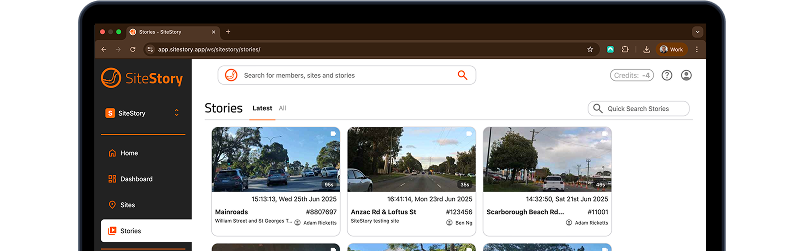
What it looks like today: GPS, device clocks, and job scheduling systems already contain the metadata you need. The gap is connecting those data sources to the capture moment automatically. Tools like SiteStory embed location and timestamp data at the point of capture, so the crew's only job is to hit record. The compliance metadata populates itself.
How to apply it: Map every metadata field your compliance records require. For each one, determine whether it can be pulled from an existing source (GPS, schedule, device ID) rather than entered manually. Every field you automate is one less reason for a crew member to skip the step entirely.
4. Build Documentation Into Existing Routines, Not Around Them
Why it matters: Traffic management crews already perform required site inspections after every setup. Creating a separate "documentation step" on top of that inspection doubles the perceived workload without doubling the value. The result is predictable: one task gets done thoroughly and the other gets skipped.
What it looks like today: The most effective automated documentation workflows do not add new tasks. They attach recording capability to tasks that already exist. A post-setup drive-through becomes a video record. A pre-shift briefing becomes an audio log. Common site setup mistakes like poor signage placement or forgotten after-hours configurations get caught not by adding inspections, but by making existing inspections produce better evidence.
How to apply it: List every routine your crew already performs on site. Identify which routines, if recorded, would satisfy your documentation requirements. Attach capture tools to those routines. Do not create new ones.
5. Prioritise Shareable Proof Over Internal Filing
Why it matters: Documentation that lives in a folder no one opens until a dispute arises is a liability, not an asset. Traffic management operations face client queries, council reviews, and incident investigations where the speed of producing evidence matters as much as the evidence itself. A perfectly organised archive that takes two days to search is functionally the same as no archive.
What it looks like today: Traditional construction document management systems optimise for storage and categorisation. Traffic operations need instant shareability. When a client questions whether a site was set up correctly at 6 AM on a Tuesday three weeks ago, the answer needs to arrive in minutes, not days. Video evidence provides irrefutable visual proof that resolves disputes faster than any written log.
How to apply it: Test your current system with this scenario: a client calls at 2 PM asking for proof of this morning's setup at a specific intersection. Time how long it takes to locate, verify, and send the relevant documentation. If it takes more than five minutes, your system is optimised for the wrong outcome.
6. Measure Documentation Cost Per Site, Not Per Project
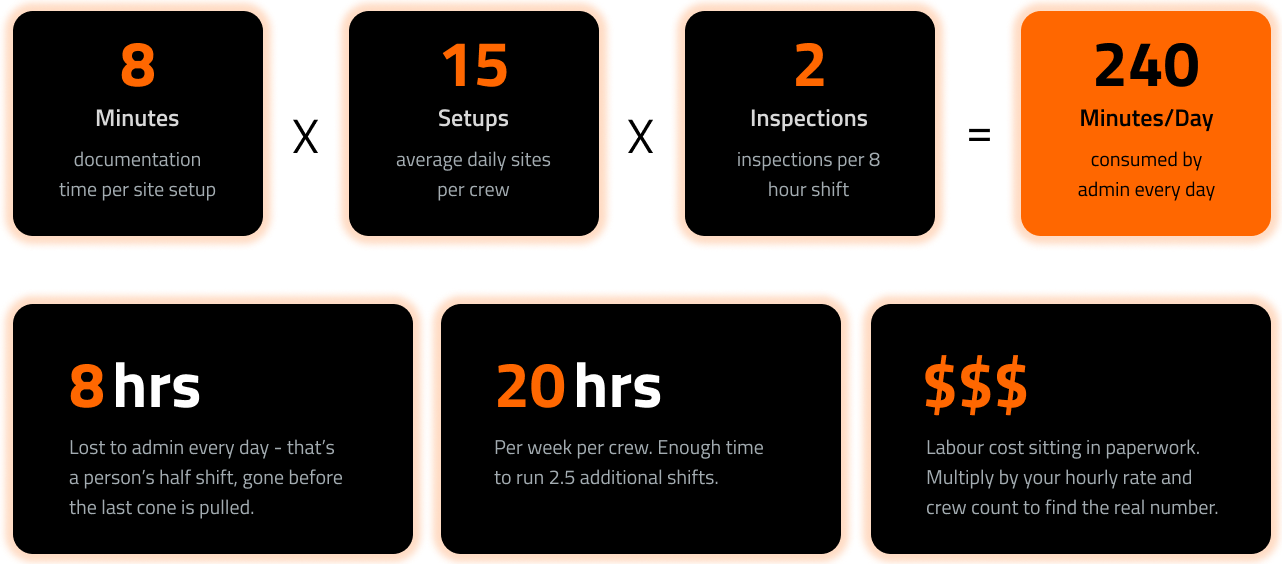
Why it matters: Construction productivity metrics typically measure documentation overhead across an entire project lifecycle. That framing hides the real cost on traffic sites, where the relevant unit is the individual setup. A tool that adds eight minutes of documentation time per setup, across fifteen setups per day and two inspections per shift, costs 240 minutes of labour daily. That is a person’s half a shift, consumed by admin.
What it looks like today: Most operations leaders track project-level compliance ("Did we document everything?") but not site-level efficiency ("How long did documentation take per setup?"). Research on integrated planning tools shows productivity gains of up to 70% when workflows are measured and optimised at the task level rather than the project level.
How to apply it: For one week, have crew leaders note the start and end time of documentation activities at each site. Calculate the per-site average. Multiply by daily site count and crew size. The number will likely surprise you, and it gives you a concrete baseline for evaluating any new tool or workflow.
7. Design for the Worst Conditions, Not the Best
Why it matters: Traffic sites operate in rain, dust, low light, and high-visibility zones where stopping to fiddle with a device is not just slow but unsafe. Any documentation tool that works well in an office demo but fails when a crew member is wearing gloves on a highway shoulder at 5:30 AM is the wrong tool.
What it looks like today:Video compliance systems designed for field-first use account for these constraints by minimising on-screen interaction, supporting one-handed operation, and functioning reliably on standard mobile devices without specialised hardware. The best tools assume the user cannot look at the screen for more than two seconds.
How to apply it: Test every documentation tool in realistic field conditions before purchasing. Hand it to your most sceptical crew member on a wet morning with gloves on. If they can produce a usable compliance record without removing PPE or stopping work, the tool passes. If not, it does not matter how many features it has.
The Pattern Across All Seven
Every item on this list points to the same underlying principle: on high-turnover traffic sites, documentation speed and documentation quality are not in tension. They are the same thing. The fastest method (a single-tap video during an existing inspection) also produces the most complete record (continuous visual proof with embedded metadata).
The tools that slow crews down share a common design assumption: that documentation is a separate administrative task performed after the real work. On a stable building site, that assumption holds. On a traffic site where "after" means "at the next location," it collapses. The construction documentation automation that actually works here does not digitise paperwork. It makes the work itself produce the record.
The tradeoff to acknowledge: simpler capture tools produce less structured data. You trade granular form fields for rich visual context. For traffic management, where proving site conditions matters more than tracking submittals, that trade is overwhelmingly favourable.
Where to Start
You do not need to overhaul your documentation system this week. Start with two moves. First, measure your current per-site documentation cost (item 6). That number will either confirm your system works or make the case for change without any persuasion needed. Second, pick one routine your crew already performs and attach a capture tool to it (item 4). One video per site, taken during the inspection you already do.
Traffic management is growing. The Department of Employment and Workplace Relations projects construction employment to grow 9.5% through 2033 , driven by infrastructure projects that demand more traffic control, more documentation, and more accountability. The crews that figure out how to document without stopping will be the ones that scale.
Frequently Asked Questions
What is construction documentation automation?
Construction documentation automation uses technology to reduce or eliminate manual steps in creating, organising, and storing project records. On traffic management sites, this typically means capturing video or photo evidence with automatically embedded metadata (GPS location, timestamp, project ID) so crews do not have to fill out forms or tag files manually. The goal is a compliance-ready record that requires minimal human input beyond initiating the capture.
Why do standard digital construction tools slow down traffic management crews?
Most construction platforms were designed for stable job sites with long timelines and dedicated project managers. They require multi-step logins, project selection, form completion, and manual uploads. Traffic crews operate across multiple short-duration sites daily, where every extra minute of admin is multiplied across every setup. The tool overhead that is negligible on a six-month building project becomes a significant productivity drain when repeated six times a day.
How does video documentation reduce rework and disputes on traffic sites?
Video captures continuous context that photos and written logs cannot. A single walkthrough or drive-through shows signage placement, lane configurations, delineation spacing, and crew positioning in sequence. When a client or council questions whether a site was set up correctly, video provides immediate, unambiguous proof. This resolves disputes in minutes rather than weeks and eliminates the "he said, she said" dynamic that drives costly rework or legal exposure.
When should traffic management contractors consider adopting video documentation?
The trigger is usually one of three events: a compliance audit that exposed gaps in your records, a dispute where you could not produce adequate proof of site conditions, or a growth phase where your crew count outpaces your ability to manage traditional documentation requirements. If any of these apply, the cost of not switching already exceeds the cost of transitioning. Start by measuring your current per-site documentation time to quantify the opportunity.
Which documentation tasks should be automated first?
Start with the tasks that happen most frequently and carry the highest compliance risk. For traffic management, that is typically the post-setup site inspection record. Automating this single step (by capturing it as video with embedded metadata) addresses your most common documentation need while requiring the least behaviour change from crews, since they are already performing the inspection.
How can construction documentation reduce legal liability for traffic management contractors?
Visual documentation, particularly timestamped and geotagged video, creates an objective record of site conditions at specific moments. If an incident occurs and your setup is questioned, video evidence showing correct signage placement, barrier positioning, and compliance with the traffic management plan is far more defensible than a checkbox on a form. The key is consistency: documentation that exists for every site, every time, not just when someone remembers.
Sources
https://www.sitestory.app/blog/the-role-of-video-documentation-in-reducing-legal-liability
https://dancumberlandlabs.com/blog/construction-productivity/
https://www.sitestory.app/blog/video-compliance-the-new-standard-for-traffic-management-verification
https://www.dewr.gov.au/jobs-hub/construction-job/about-construction-industry
